
Registering a New Generator - Electricity Registry
Learn how to register a generator in M-RETS® by CleanCounts so you can report its generation and receive certificates.
To register a generator, you create a draft, add the generator's details and supporting documents, and submit it for review. After a CleanCounts administrator approves it, you can upload generation.
How registration works

Before You Begin
- You need an M-RETS user account in the organization with manage-level permissions to register the generator.
- Review Section 4.3 (Generators) of the M-RETS Operating Procedures.
- Have your supporting documents ready. Most registrations need proof of ownership, nameplate capacity, and expected annual output. See Step 3 for the full list.
Step 1: Create a Draft Generator
Start by creating the generator as a draft. You can save a draft at any point and come back to it later.
- Sign in to M-RETS and click Generators in the navigation menu. The page lists your organization's active, pending, and draft generators.
-
Click Add New Generator.
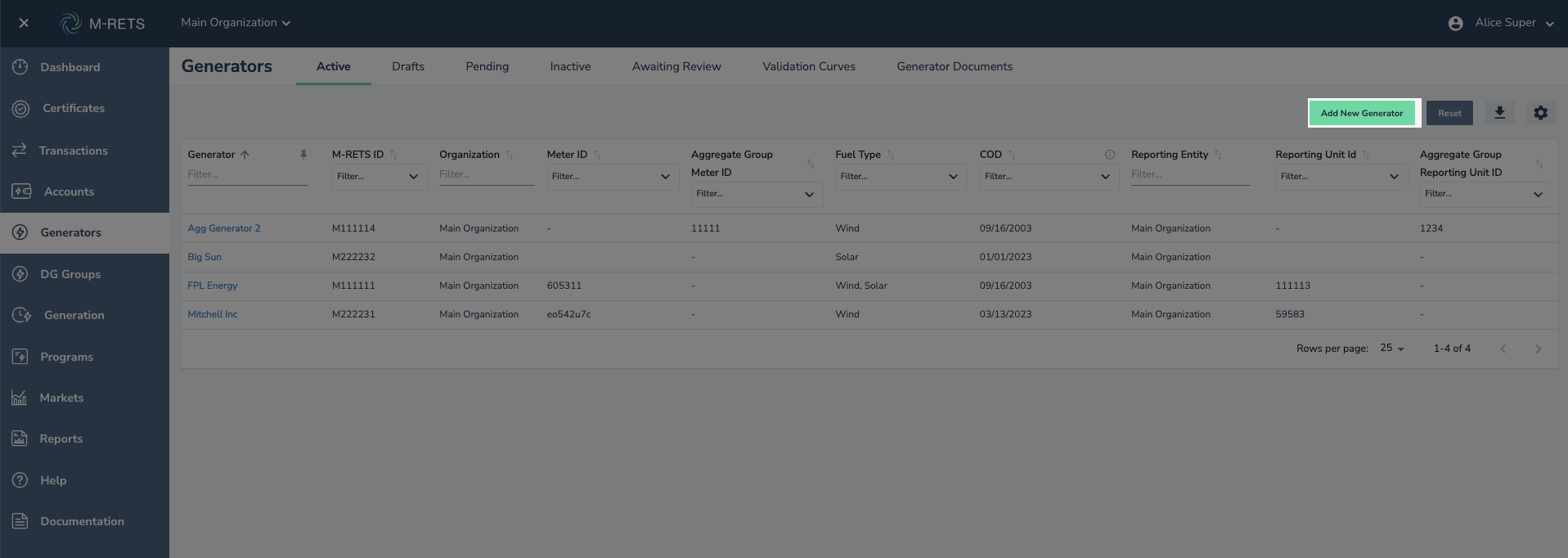
2. Click Add New Generator located in the top right corner. -
Enter a name for the generator in Facility Name and Unit Name, and then click Save Draft. You can rename it later.
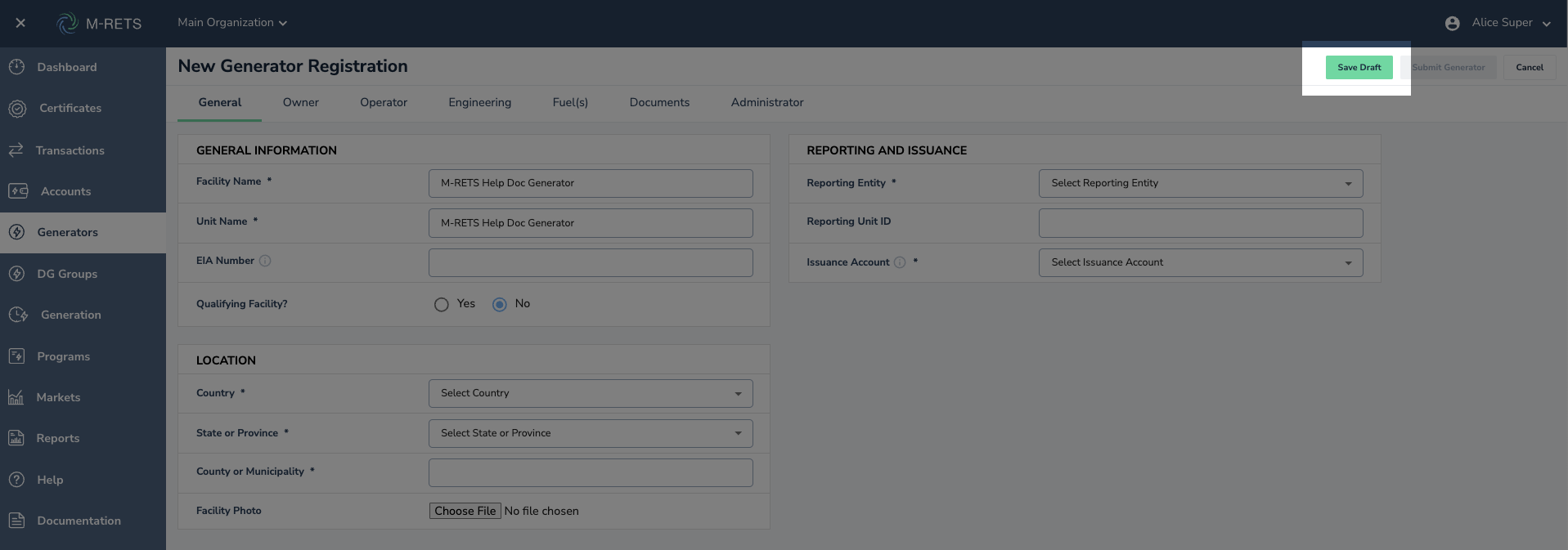
3. Click Save Draft located in the top right corner.
Your generator now has the Draft status. Click Save Draft whenever you want to save your progress.
Step 2: Complete the Registration Fields
The registration form has tabs for General, Location, Owner, Operator, Engineering, Fuels, and Program Eligibility. Fill in every field marked with an asterisk (*).
For what each field means, see the Field reference at the end of this page.
Tip: Your organization might not own the generator. In that case, you also need a Schedule A before you can submit. Have it ready before you start Step 3.
Step 3: Upload Supporting Documents
CleanCounts reviews your registration against the documents you upload, so add them before you submit. To upload a file, open the Documents tab of the registration and click Upload Document.
Forms and templates are under Registration documents on the Electric pricing and registry documents page.
| Document | Upload it if… |
| Proof of ownership and nameplate capacity, such as an interconnection agreement, PPA, contract, or engineering report | Always |
| Capacity factor and annual output documentation, such as an engineer's report or a solar design tool report (Aurora, HelioScope, PVsyst, or PVWatts) | Always |
| Line drawings showing the interconnection and installed devices | Always |
| Schedule A: Designation of Responsible Party | Your organization doesn't own the generator |
| Court or regulator order assigning registration rights | A court or regulator assigned the registration rights |
| Utility-issued Certificate of Completion or equivalent | Always |
| EIA Entity ID | The generator is in the US and over 1 MW. For smaller generators, it can speed up approval. |
| MISO or SPP data release form, with the correct CP node | MISO or SPP is the reporting entity |
| Multi-fuel report from a licensed professional engineer (Operating Procedures Appendix B-3) | The generator uses more than one fuel |
| Proof that grid power charging the battery isn't metered as generation | The generator has a battery backup |
| State certification documents | The generator is certified in Ohio or Wisconsin |
| PURPA Qualifying Facility approval and FERC Form 556 | The generator is a qualifying facility |
CleanCounts might also ask for other documents, such as a state air permit, a regulatory order, etc., where necessary.
Step 4: Submit for review
After all required fields are complete and your documents are uploaded, the Submit Generator button becomes available. Click Submit Generator to send the registration to M-RETS® by CleanCounts.
What happens next
The generator moves to Pending and CleanCounts administrators get an email. An administrator then approves it or asks you for more information. Generators with complete information are usually approved within seven business days.
Once the generator is approved, you can start uploading generation for it.
Common Questions
- Can I finish my registration later? Yes. Click Save Draft at any time. Your draft stays on the Generators page until you submit it.
- How long does approval take? Usually up to seven business days when all information and documents are complete. If you need it sooner, email [email protected].
- Why can't I see the Submit Generator button? The button appears only after every required field is complete and your documents are uploaded.
- Do I need a Schedule A? You need one if your organization doesn't own the generator, or if someone other than the owner registers it.
- What's the difference between a Certificate and an AEC? A Certificate tracks the environmental attributes of generation (MWh) from renewable sources, and it's the most common type. An Alternative Energy Certificate (AEC) tracks generation from approved non-renewable sources, such as nuclear and pumped hydro storage, that CleanCounts has approved as having an environmental benefit.
- Can I combine several small generators? If your units have separate meters, you can aggregate up to 1 MW with a distributed generation group. Contact a CleanCounts administrator to set one up.
Field reference
Use these tables to look up any field on the registration form, grouped by tab. For full definitions, see Appendix A of the Operating Procedures.
General
| Field | Required | Description |
| Facility Name | Yes | The name of the facility. |
| Unit Name | Yes | The name of the generator. |
| EIA Number | No | The ID number assigned by the US Energy Information Administration (EIA), if applicable. |
| Qualifying Facility | No | Whether the generator is a PURPA qualifying facility. |
| Reporting Entity | Yes | The entity that uploads generation (MWh) for this generator. |
| Issuance Account | Yes | The account that receives newly issued certificates. |
Location
| Field | Required | Description |
| Country | Yes | The country where the generator is located. |
| State/Province | Yes | The state or province where the generator is located. |
| County or Municipality | Yes | The county or municipality where the generator is located. |
| Facility Photo | No | A photo of the generator. |
Owner
| Field | Required | Description |
| Single-Owner Facility? | Yes | Whether one entity owns the facility. |
| Additional Owner(s) | No | Other owners, if the facility has more than one. |
| Ownership Type(s) | Yes | The owner type. Options: Electric Service Provider, Federal Marketer/Power Administrator, Investor-Owned Utility, Irrigation District, Municipal Utility, Privately Owned Distributed Generation, Rural Electric Cooperative, or Tribal Organization. An investor-owned utility is a privately owned, rate-regulated electric utility whose stock is publicly traded. |
| Does your Organization own this generator? | Yes | If you select No, upload a Schedule A. Schedule A attests that your organization holds the rights to the certificates. |
| Do you have a PPA? | Yes | Whether a power purchase agreement (PPA) exists. If you select Yes, upload a copy of the PPA. |
| Assignment of Registration Rights | Yes | Select Yes if an entity other than the owner registers the generator, and upload a Schedule A. |
| Assignment of Registration Rights Date | No | The date the owner signed Schedule A. |
| Court/Regulator Assignment of Rights | Yes | Select Yes if a court or regulator order established the registration rights, and upload the order. |
| Court/Regulator Assignment of Rights Date | No | The date the court or regulator assigned the registration rights. |
| Company Name | Yes | The owner that holds legal title to the generator. |
| Address, City, State/Province, Zip/Postal Code, Country | Yes | The owner's contact address. |
| Phone, Website | No | The owner's phone number and website. |
Operator
| Field | Required | Description |
| Job Title | No | The facility operator's job title. |
| Name | Yes | The facility operator's name. |
| Mailing Address | Yes | The operator's mailing address. |
| Mailing Address Line 2 | No | The second line of the mailing address. |
| City, State/Province, Zip/Postal Code, Country | Yes | The rest of the operator's mailing address. |
Engineering
| Field | Required | Description |
| Generator Classification | No | One of the following: Wholesale Generation (connected to the distribution network and sells to the wholesale market), Wholesale Generation also serving On-Site Loads (sells to the wholesale market and also serves on-site load), or Customer-Sited Distributed Generation (on-site customer generation, also called distributed energy resources). |
| Balancing Authority | No | The entity that balances load, interchange, and generation in its area and supports interconnection frequency in real time. |
| Balancing Authority ID | No | The ID code for the balancing authority, if applicable. |
| Interconnected Utility | Yes | The utility whose distribution system the generator connects to. This utility issues the interconnection agreement and certificate of completion. |
| Interconnected Utility ID | Yes | The ID code for the interconnected utility, if applicable. |
| Aggregate Metering | Yes | Whether multiple units that don't share essential generating characteristics share one meter. If units have separate meters, you can aggregate up to 1 MW by using a distributed generation group. To set one up, contact a CleanCounts administrator. |
| Is this a Revenue Quality Meter? | No | Whether the meter is revenue quality. |
| Commenced Operation Date | Yes | The generator's in-service date. |
| Nameplate Capacity (MW) in A/C | Yes | The generator's maximum rated output. |
| Capacity Factor | Yes* | The ratio of the energy the generator produces over a period to the energy it could produce at continuous full power over the same period. |
| Maximum Annual Energy | Yes* | The facility's maximum output in MWh over 365 days. |
| Biomass Net Generation BTU/kWh | No | The heat rate: the energy in British thermal units (Btu) that the generator uses to produce 1 kWh of electricity. |
| Repower Date(s) | No | If the generator was repowered, the in-service date of the repowered generator. |
* Enter either Capacity Factor or Maximum Annual Energy.
Fuels
Select the fuel type and fuel source that match your generator. For details, see Appendix B-4: Fuel Types of the Operating Procedures.
| Fuel type | Fuel sources |
| Biogas | Biogas; animal waste; anaerobic digester system; liquid fuels from plant or animal sources, such as ethanol, biodiesel, vegetable oil, or animal fats; methane or other combustible gases from the processing or decay of plant, animal, or municipal solid waste |
| Biomass | Biomass; direct combustion, gasification, or liquefaction; agricultural products, wood products, or agricultural byproducts and wastes; mixed municipal solid waste or refuse-derived fuel; woody or herbaceous plant matter; processed plant materials from manufacturing, construction, or demolition waste; methane or other combustible gases from decay; liquid fuels from plant or animal sources; landfill gas; animal waste |
| Coal | Coal |
| Diesel | Diesel |
| Flared Gas | Flared gas |
| Fuel Cells | Fuel cell using renewable fuels; fuel cell using non-renewable fuels |
| Geothermal Energy | Geothermal energy; dry steam; flash steam; binary cycle |
| Hydroelectric Water | Hydroelectric water; nameplate capacity less than 4 MW, 60 MW, or 100 MW |
| Hydrogen | Hydrogen |
| Jet | Jet |
| Municipal Solid Waste | Municipal solid waste; energy recovery facility for mixed municipal solid waste or refuse-derived fuel; anaerobic digester system; landfill gas |
| Natural Gas | Natural gas |
| Nuclear | Nuclear |
| Oil | Oil |
| Pumped Hydro Storage | Grid electricity |
| Solar | Solar PV; solar thermal |
| Tidal or Wave | Tidal or wave |
| Tire Derived Fuel | Tire-derived fuel |
| Waste Heat Recovery (WHR) | Waste heat recovery or recycled energy |
| Waste Oil | Waste oil |
| Wind | Wind |
Biogas and biomass sources also include two attributes: the facility was built in compliance with new source performance standards under the federal Clean Air Act, and it uses the maximum achievable or best available control technology for its type.
Program eligibility
| Program | Description |
| Alternative Energy Certificate | The generator uses a non-renewable, emission-free fuel type. |
| Ecologo Certified | The generator is certified by EcoLogo. |
| IL ABP | The generator participates in the Illinois Adjustable Block Program. |
| Illinois Utility Eligibility | The ICC certifies the generator for the Illinois utility program. |
| Iowa Eligibility | The IUB certifies the generator for the Iowa RPS. |
| Iowa AEP Eligibility | The IUB certifies the generator for the AEP program. |
| Iowa Voluntary Green Eligibility | The generator meets the Iowa Voluntary Green program requirements. |
| Manitoba Eligibility | The generator meets the Manitoba requirements. |
| Minnesota Eligibility | The generator meets the Minnesota RPS requirements. |
| Minnesota SES Small Solar Eligibility | The generator meets the Minnesota small solar eligibility requirements. |
| Montana Eligibility | Montana certifies the generator for the Montana RPS. |
| North Dakota Eligibility | The generator meets the North Dakota REO standards. |
| Ohio Eligibility | Ohio certifies the generator for the Ohio RPS. |
| South Dakota Eligibility | The generator meets South Dakota standards. |
| Wisconsin: Bankable Eligibility | The Wisconsin PSC recognizes the generator as bankable. |
| Wisconsin: Non-bankable Eligibility | The Wisconsin PSC recognizes the generator as non-bankable. |
See also
• Transfer or reassign a generator
• M-RETS® by CleanCounts Operating Procedures
• Appendix A: Generator Registration Static Data Guide
